BossKinBossKin

Time & attendance, shift scheduling, leave and payroll — all in one app

No more chasing timesheets and month-end Excel files. Employees clock in with GPS from their phone, managers approve with one tap, and payroll calculates itself by the rules.

Install on your phone:
No time clock neededRuns on Android and the web browserEnglish and Vietnamese
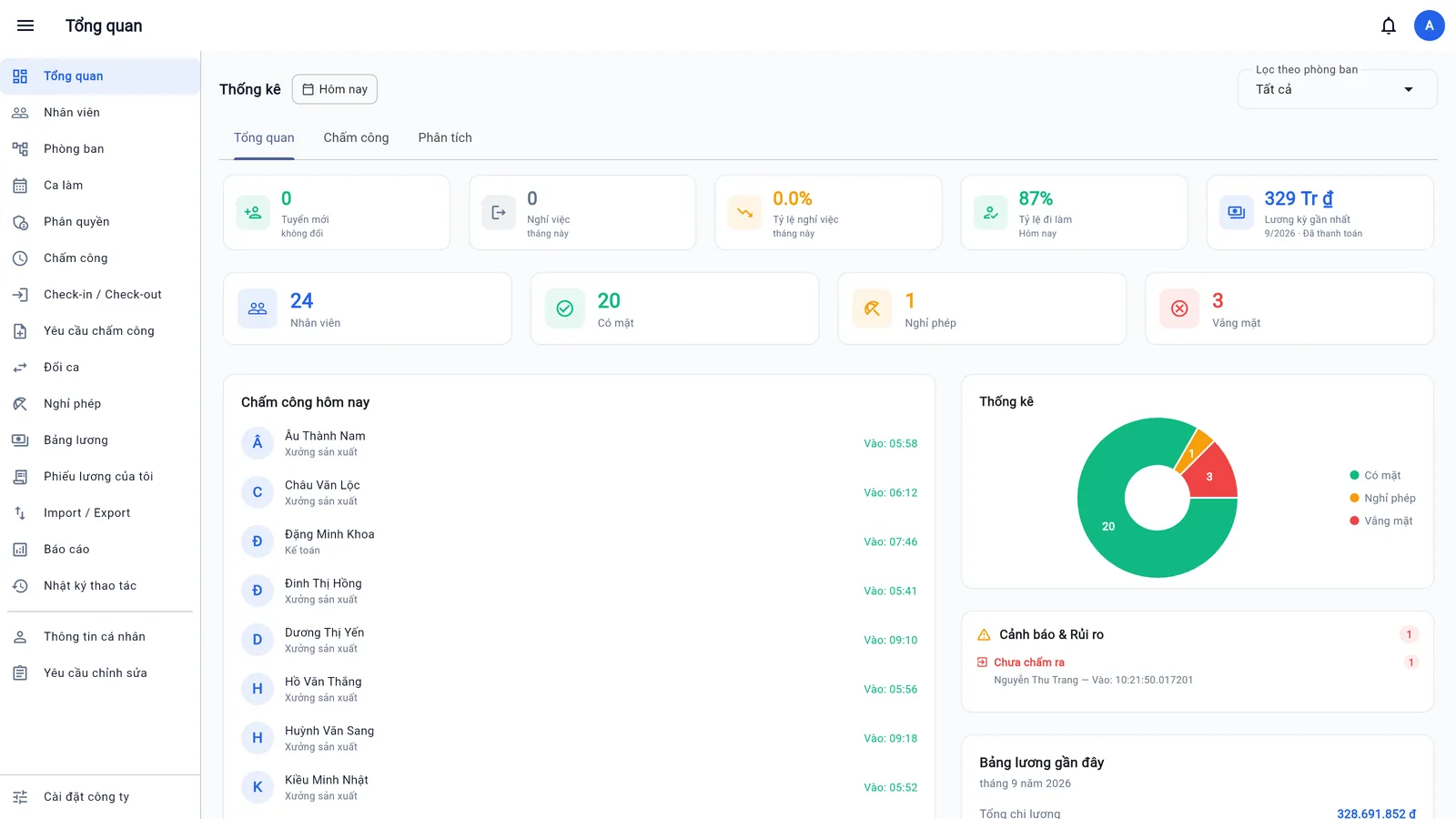
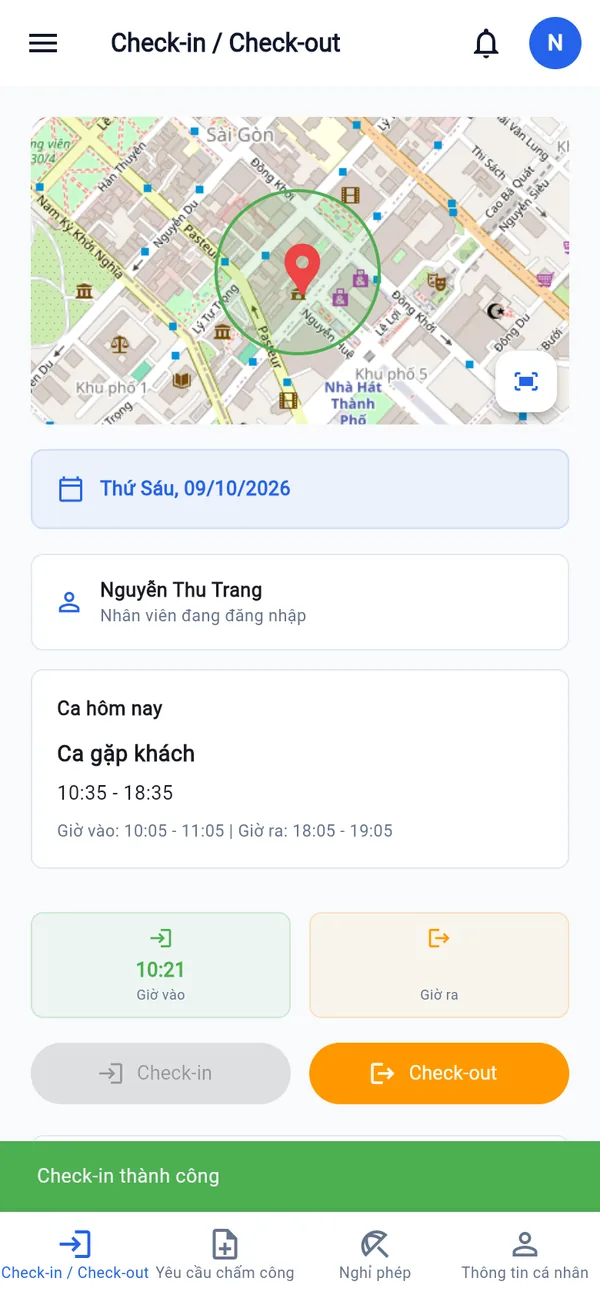
BossKin overview screen: employees present, on leave, absent today and the latest payroll Phone clock-in screen with a map of the office location
< 1 minuteto approve a whole period for 300 employees
GPS + 1 devicestops buddy punching
Social insurance · income taxcalculated automatically by Vietnamese regulations
8 reportsexported to Excel in seconds
On your phone

Install BossKin on your phone

No app store needed. Android downloads the install file directly; on iPhone you add a shortcut to the home screen — next time, tap the BossKin icon and you go straight to clocking in.

iPhone / iPad

Open in Safari, tap the Share button, then choose “Add to Home Screen”.

Android

Download the BossKin install file and install it like an app: shift reminders and quick clock-in right from the notification.

Quick look

BossKin in 1 minute

Time & attendance, shifts, leave and payroll — see how BossKin brings everything into one place.

Want a closer look at each screen? Watch the full 90-second version →

Features

Everything HR does every day, in one place

Attendance

GPS clock-in right on your phone

Employees open the app and tap Check-in. BossKin verifies location and device before recording.

  • Clock-in only works within a radius around the office, set per company or per department
  • Tie each account to one phone (optional) — hard to clock in for someone else
  • Rejects spoofed locations and very weak GPS signals
Learn about GPS clock-in →

Successful clock-in on the phone
Shifts

Schedule a whole factory in minutes

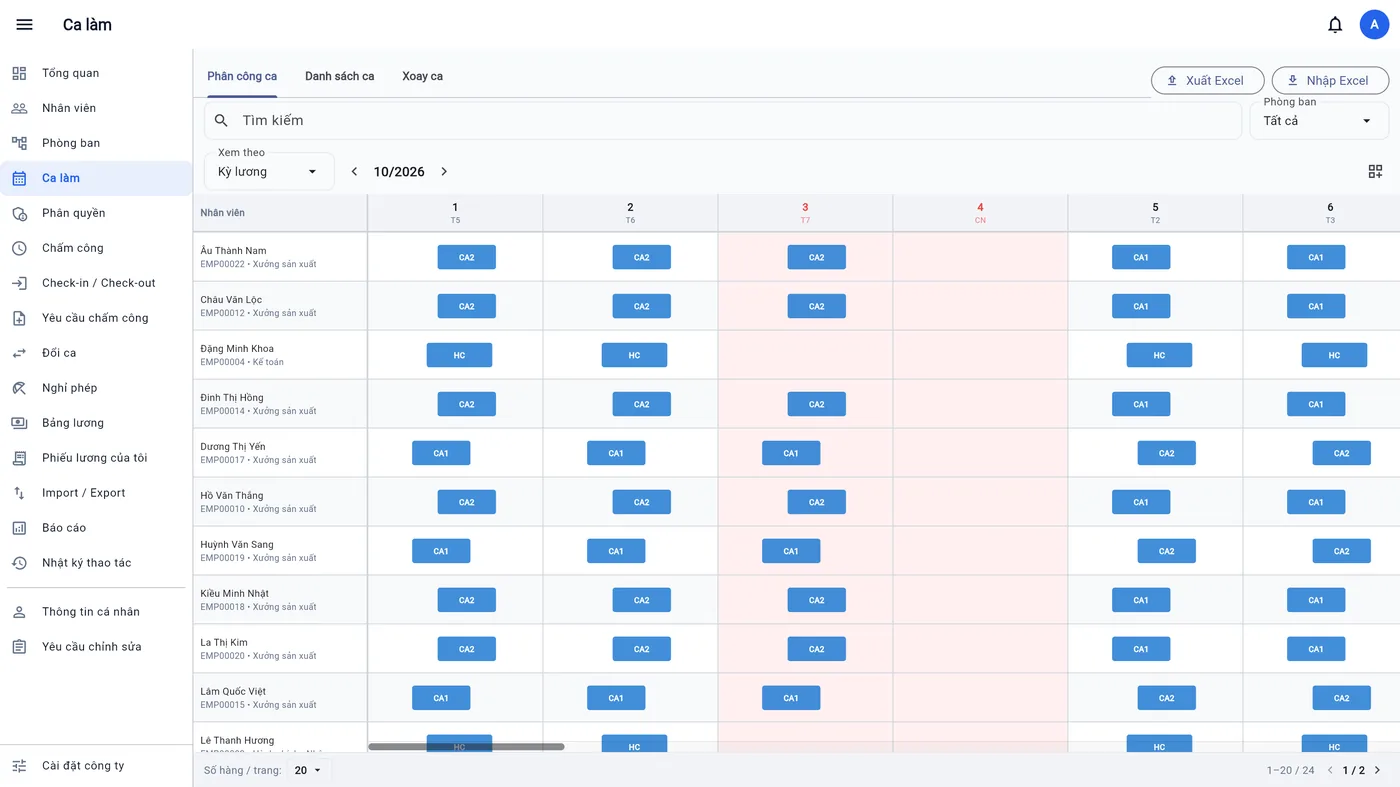
Shift roster by pay period, scroll through the whole month, import and export with Excel.

  • Fixed shifts, overnight shifts, split shifts and flexible shifts that only need the required hours
  • Rotation templates generate schedules for many people at once
  • Employees request to swap or hand over shifts, managers approve
  • Work calendars per department (half-day Saturdays…) and yearly holidays, for correct standard working days

Read more: night, split and flexible shifts →

Monthly shift roster
Leave

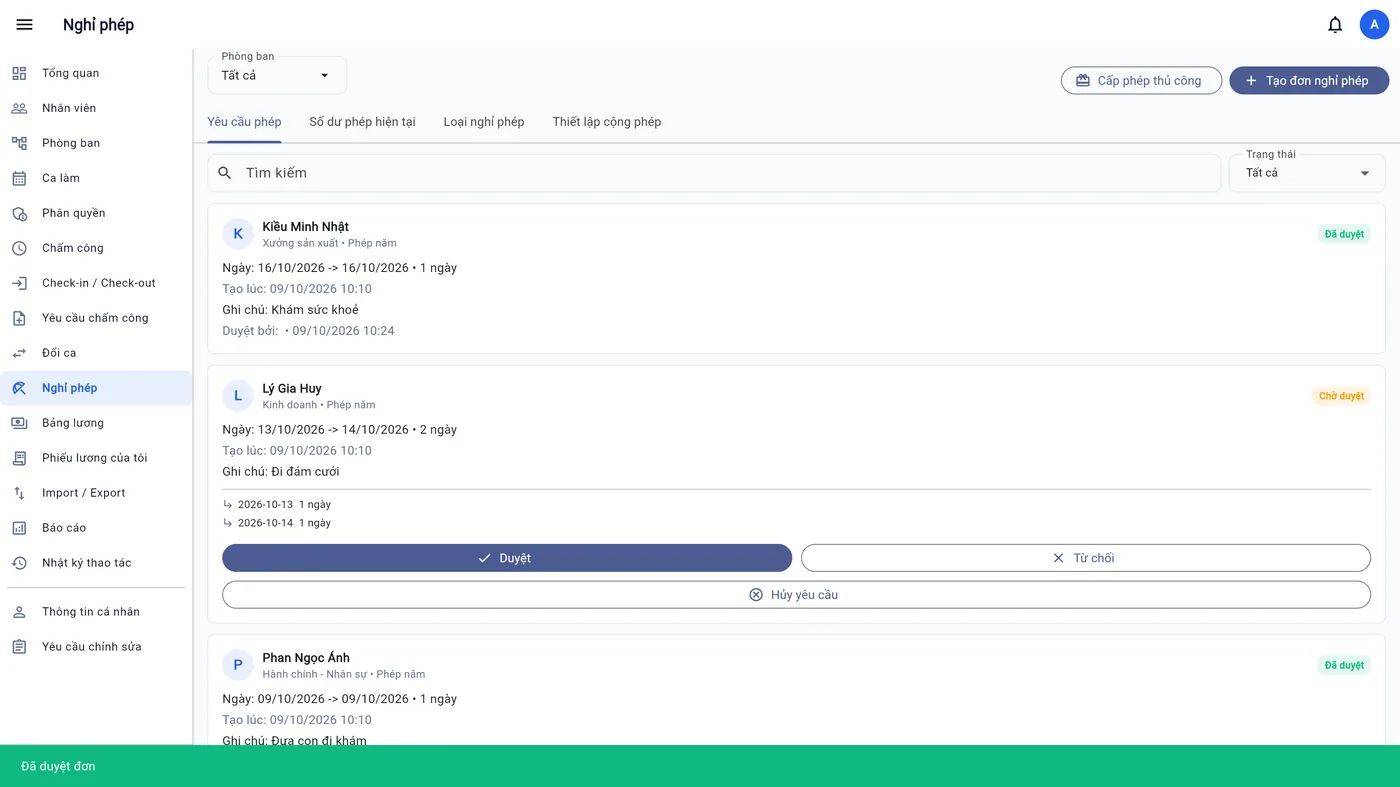
Request leave in the app, approve with one tap

Leave and time-correction requests are sent from the phone and go straight to the approver.

  • The leave ledger deducts only days that have a shift, and refunds when a request is cancelled
  • Leave by the day or by the hour, automatically excluding lunch break
  • Leave accrues monthly according to your company's rules

Read more: leave pools and approvals →

List of leave requests with approve buttons
Period close

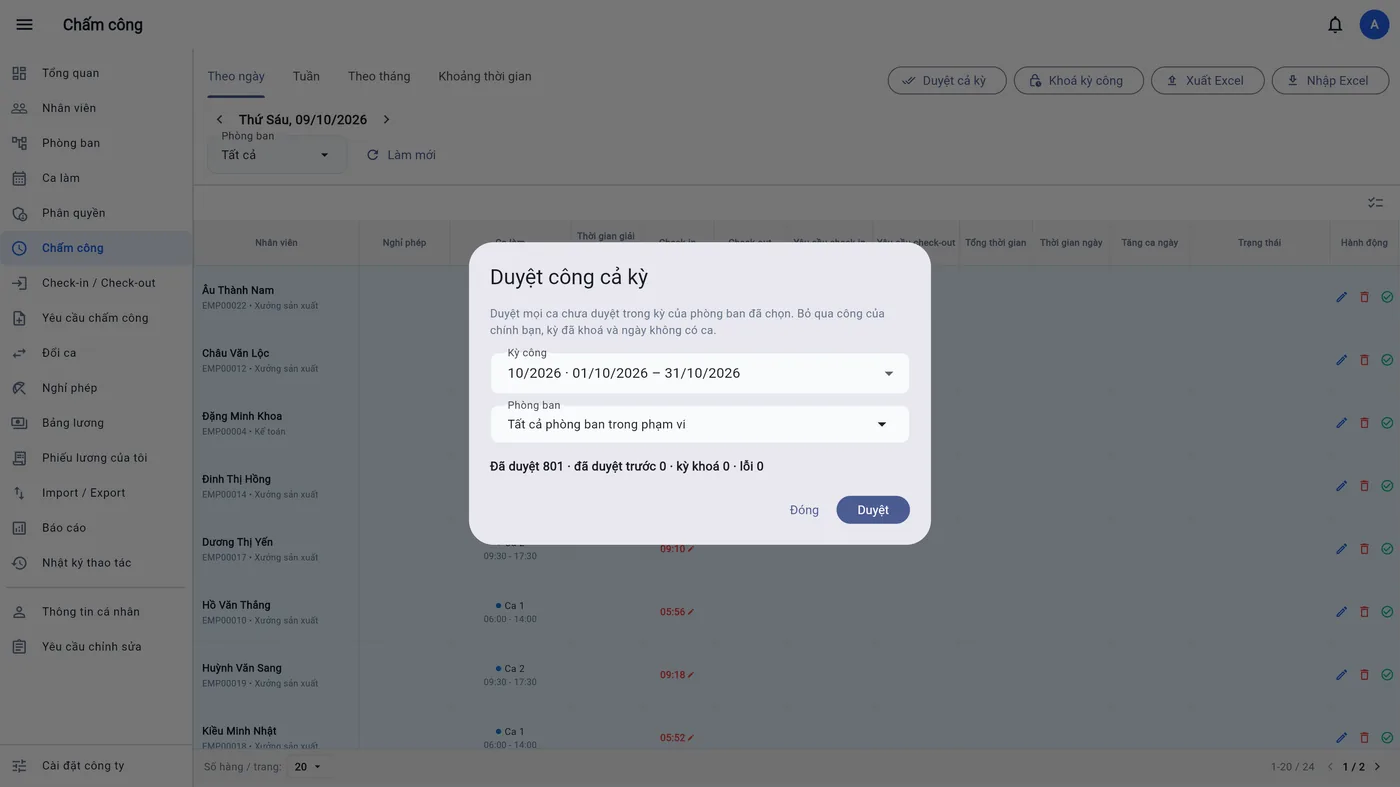
Close the period with one button

Approve all attendance for the company or a department, then lock the period so figures can't be changed.

  • Approve a whole period for 300 employees in under a minute
  • Locking a period blocks edits and new requests into the closed period
  • Late arrival, early leave, and day and night overtime are calculated automatically
Dialog to approve a whole period
Payroll

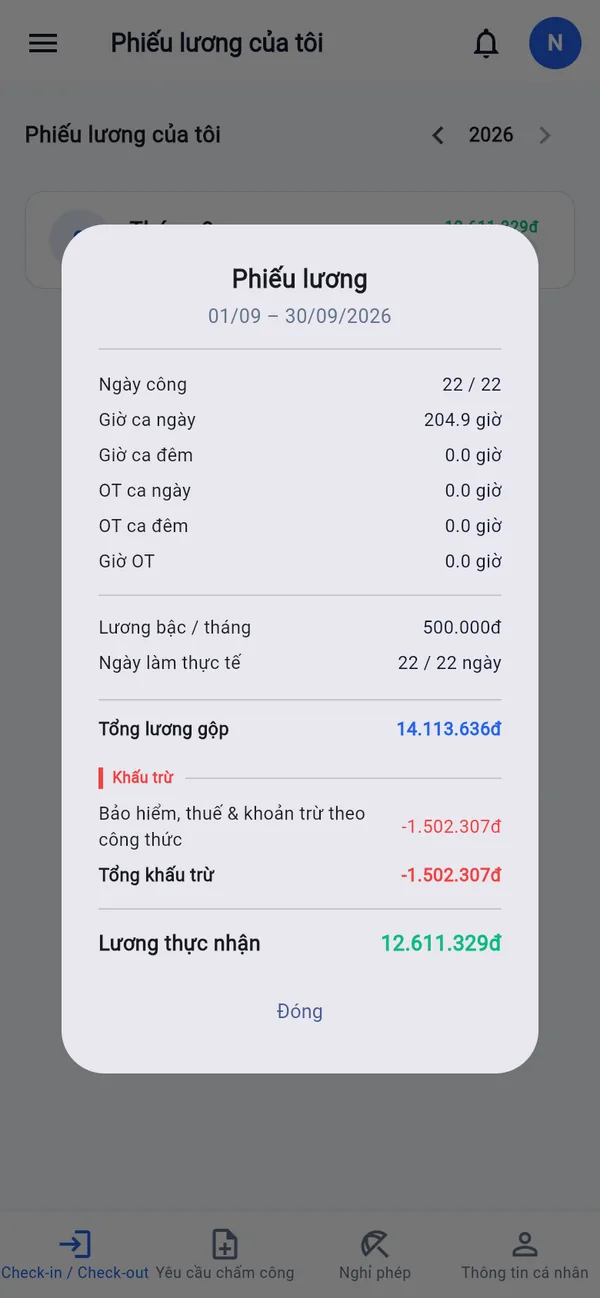
Payroll calculates itself, payslips on the phone

Pay is calculated from closed work days, paid leave and your company's own formulas.

  • Personal income tax by the 2026 schedule, with personal and dependent deductions; insurance with contribution caps
  • Pay and allowances come from the contract; mid-period raise addenda are still calculated correctly
  • Pay grades by day or by hour, with your own variables and formulas
  • Accountants cannot approve or pay out their own salary

Read more: payroll, insurance and tax →

An employee's payslip on the phone
Reports & security

Clear figures, tight permissions

Everyone sees and does only their own part of the work.

  • 8 Excel reports: HR, attendance, overtime, payroll cost, yearly overview
  • Permissions by role and by department
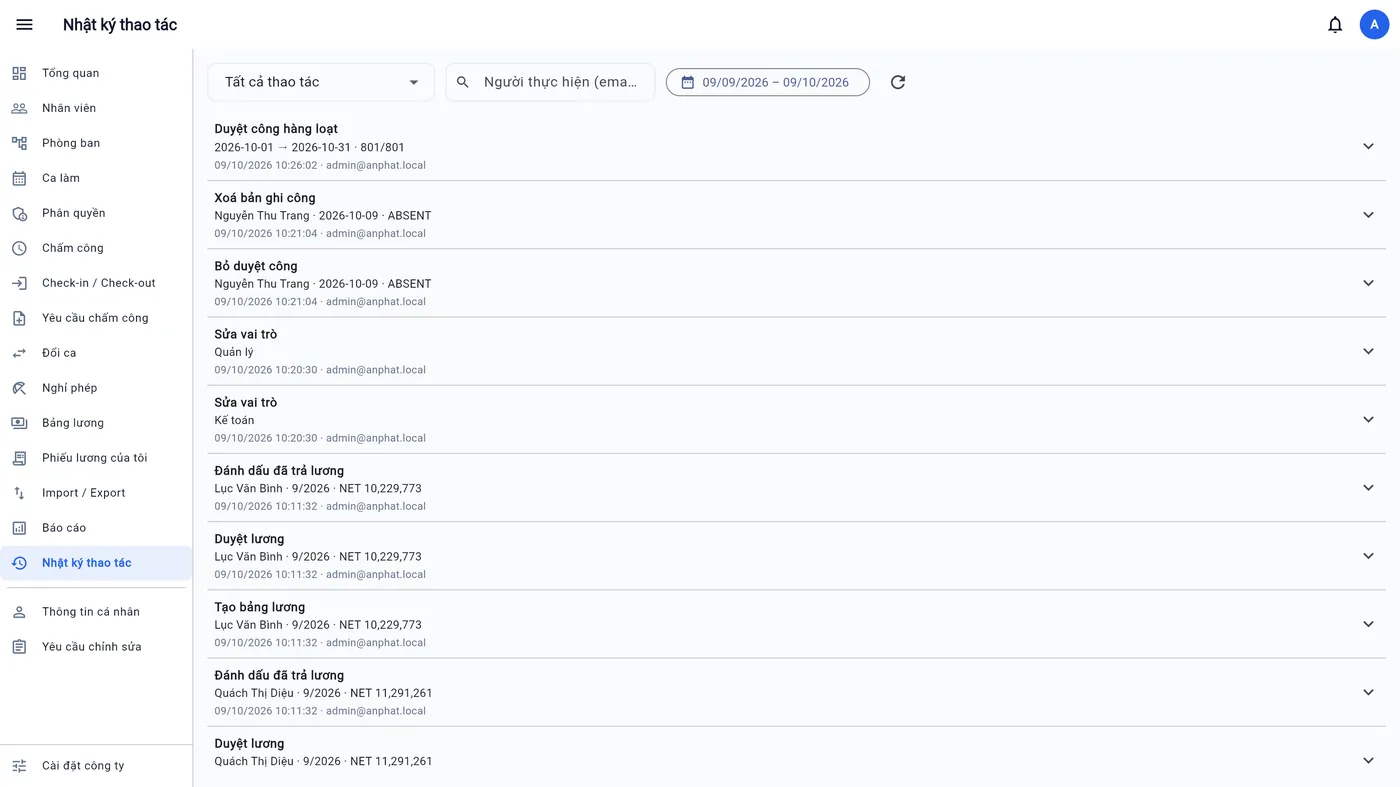
  • An audit log records every sensitive action; two-factor authentication for administrators
Audit log
Employee records

Complete employee records, no extra software

Employment contracts

Probation, fixed-term and indefinite contracts, addenda, allowances. Reminders before a contract or probation ends.

Career history

Transfers, promotions and pay grade changes with effective dates; an org chart based on direct managers.

Tax & insurance

Tax code, social insurance book, and dependents deducted by month; sensitive numbers are masked for people without permission.

HR documents

ID cards, degrees and signed contracts are stored privately and opened only through temporary links; alerts for documents that are expiring or missing.

Who it's for

One job each, one app

Business owners

See at a glance who is at work today and what payroll costs, without asking anyone.

HR & accounting

No more manual timesheet reconciliation. Close attendance, run payroll and export reports in one sitting.

Department managers

Schedule shifts, approve leave and time corrections for your direct reports right on your phone.

Employees

Clock in, request leave, swap shifts, check leave balance, payslips, contracts and documents — with just a phone.

Get started

Up and running on day one

Import employees from Excel

Use the ready-made template; preview every row before importing. See the guide →

Create shifts and schedule

Define shifts, apply a rotation template or import the roster from Excel.

Employees install the app

Log in with the issued account, change the password the first time, and start clocking in.

Install BossKin on iPhone / iPad

Do this on the phone you want to install it on.

  1. Tap Open BossKin below — the login page opens in Safari.
  2. Tap the Show guide button at the bottom of the screen and follow the steps (the blue arrow points to the button to tap).
  3. Scroll down and choose Add to Home Screen, then tap Add.
  4. The BossKin icon appears on your home screen — open it from there and log in.
Open BossKin

Install BossKin on Android with the install file

Do this on the phone you want to install it on. The file is about 70 MB — use Wi-Fi.

  1. Tap Download the install file below, wait for it to finish, then tap Open.
  2. The phone asks for permission to install from the browser: tap Install → turn on Allow from this source → go back.
  3. Tap Install, then tap Open.
  4. Log in with the issued account and allow notifications when asked.

Don't want to install the file? Adding a browser shortcut works too.

Install BossKin on Android from the browser

Do this on the phone you want to install it on.

  1. Tap Install below — BossKin opens in Chrome.
  2. Tap the Install BossKin at the bottom of the screen, then tap Install when the phone asks you to confirm.
  3. The BossKin icon appears on your home screen — open it from there and log in.

Don’t see the button? Tap the three dots ⋮ → Add to Home screen.

Install
Pricing

Pay for the employees and features you use

Turn on only the features your business needs and pay only for active employees. No time clock to buy, no hidden setup fees.

From just5,000 VND/ employee / month
Monthly cost = number of employees × price of the features you turn on

Attendance & shifts

From 5,000 VND / employee / month

A starter plan for businesses still tracking attendance on paper or Excel.

  • GPS clock-in on the phone, device binding
  • Shift scheduling, overnight, split and flexible shifts
  • Timesheets, attendance approval, time corrections
  • Excel export / import
Free trial

Add leave & payroll

Quote by company size

From period close to payslips in one app.

  • Everything in Attendance & shifts
  • Leave requests, leave balances, shift swaps
  • Payroll, insurance, income tax, custom formulas
  • A payslip for every employee
Get a quote

Full HR

Quote by company size

Manage employee records from the day they join until they leave.

  • Everything in the plans above
  • Employment contracts, addenda, allowances
  • HR documents, expiry alerts
  • Org chart, manager approvals, reports
Get a quote

1-month free trial with your real data, with help setting up and 24/7 incident support. Prices exclude VAT. You can turn each feature on or off at any time.

FAQ

Frequently asked questions

How is BossKin priced?

Pricing is by number of employees and the features you turn on, from just 5,000 VND per employee per month. You get a 1-month free trial with real data, help with setup and 24/7 incident support, then receive a quote matched to your size and the features you need.

Do I need to buy a time clock?

No. Employees clock in with their own phones; BossKin checks the GPS location and only accepts the device registered to the account.

Is GPS clock-in accurate, and can someone clock in for a colleague?

BossKin only records a clock-in when the employee is within the radius you set for the company, department or work location. Spoofed locations and very weak GPS signals are rejected; when “only clock in on the registered device” is on, each account can clock in from one phone only, so it is hard to clock in for someone else.
What if an employee changes phones?

An administrator unbinds the device for that employee; the next clock-in on the new phone is bound again. The action is recorded in the audit log.

Does payroll include insurance and tax?

Yes. Payroll calculates social insurance 8%, health insurance 1.5%, unemployment insurance 1% and progressive personal income tax. You can define your own pay formulas and variables.

Are overnight, split and flexible shifts supported?

Yes. Up to 4 shifts per day; overnight shifts count night hours correctly; flexible shifts only require the full number of hours within the allowed window.

What devices does it run on?

An Android app for employees and a web version for managers, HR and accountants on a computer. The interface is available in Vietnamese and English.

Can I move my existing Excel data over?

Yes. Employees, departments, shifts and rosters can be imported from Excel; every import shows a preview of the changes before saving.

Free trial

Try BossKin with your own company's data

Leave your details and we'll walk you through it: import employees, schedule shifts and run a test period before you decide.

Email is required: the trial signup details will be sent to this email. Free 30-day trial, no limit on employees; each email can sign up only once.