 BossKin
BossKin › Leave management
Leave management: pools, approvals and the deduction ledger
Leave is hardest to manage at the balance: who has how many days left, how a rejected or cancelled request is refunded, and who approves first. This article describes how BossKin manages leave pools, approvals and a ledger of every deduction and refund so that figures can be reconciled.
Leave types and leave pools
The company creates leave types: annual leave, sick leave, personal leave, unpaid leave and so on. Each type has a unit (days or hours), whether it is paid, and whether it deducts from a leave pool (turned off for types such as unpaid leave).
Days of leave are stored in pools. A pool can be a general pool used by every type that deducts, or a dedicated pool for one leave type. When a request is created, BossKin deducts from the dedicated pool of that type first, then from the general pool. A pool can have an effective period, and once it expires it can no longer be used.
Automatic accrual and manual grants
- Automatic accrual: set rules to add leave monthly or yearly by length of service; the system runs every night.
- Manual grants: use them for opening balances, bonus leave or make-up leave; choose the employee, the pool, the amount, the effective period and a note.
- Opening balances from Excel: when switching systems, import the days still available (not the full-year entitlement). See moving data from Excel.
Employees create requests
Employees choose the leave type, the request kind (by day, one or several days, or by hour), the period and a reason, right on their phone. BossKin calculates the amount by the company's rules:
- Only days on which the employee has a shift are counted; public holidays and days off by the work calendar are skipped.
- Hourly leave does not count the mid-shift break.
- A type that deducts from a pool needs enough balance before the request can be created.
- A request for a public holiday or a day without a shift is rejected at creation.
The employee sees the remaining balance, which is the total of the pools still in effect.
Approval: one step or two
There are two approval modes, chosen in Company settings:
- By permission and scope: someone with leave approval permission in their department scope approves directly.
- Direct manager first, then HR: the request shows “Waiting for manager” until the employee's direct manager approves step 1; HR approves at the end. Managers get a push notification when a request arrives and have a dedicated screen for their team's requests.
Approving keeps the leave that was already deducted; rejecting (with a reason) or cancelling returns it.
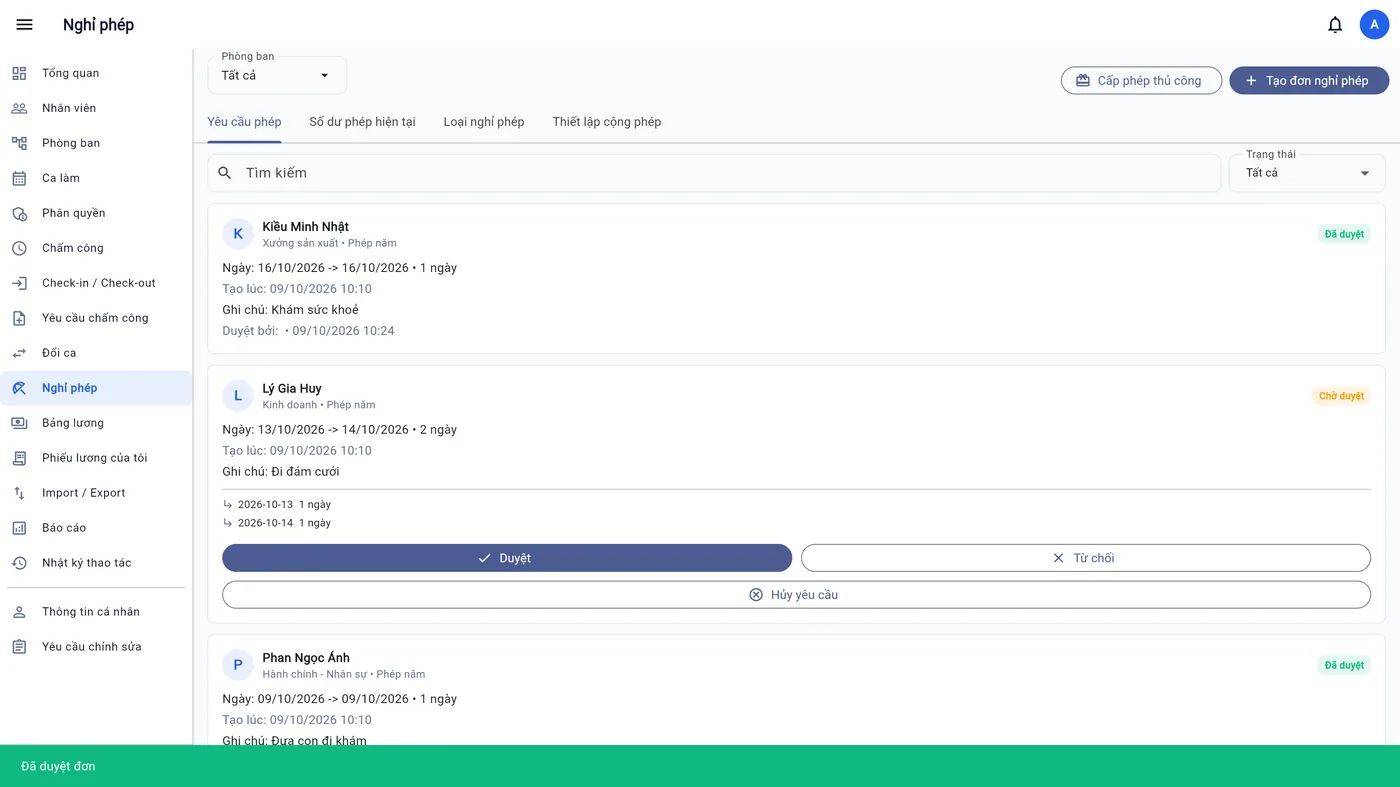
The deduction / refund ledger: trace every day of leave
Each time leave is deducted, BossKin records how much came from each pool, against the original request. When a request is rejected or cancelled (including one that was already approved), the leave is returned to exactly the pools it was taken from (the pool deducted last is refunded first). An employee's leave history has a “Deduction/refund ledger” tab showing, for each request, how much was deducted or refunded and from which pool, so any question about a balance can be traced straight to its cause.
How it connects to attendance and payroll
- Approved leave days are not treated as absences in the alerts sent to managers.
- Paid and unpaid leave days flow into payroll as system variables; see payroll.
- Holidays and the work calendar decide which days count as days off; see also scheduling shifts.
Frequently asked questions
Can employees take half a day or a few hours?
Yes, with a leave type counted in hours or by choosing the “by hour” request kind. The mid-shift break is not counted as leave.
What if I want to cancel a request that is already approved?
Someone with permission cancels the request; the leave is returned to exactly the pool it was taken from, and this appears in the deduction/refund ledger.
Does unused leave carry over to next year?
A pool has an effective period the company sets when granting it. Whether leftover leave carries over depends on company policy; when needed, grant a new pool with a longer effective period manually.
Manage leave in one app
Start a free trial to try creating leave types, leave pools and approving your first request with your own company's data.
Start free trial